


Instant live captions
See every sentence transcribed and translated as it’s spoken, with captions streaming as words are spoken.
Mingle is a live voice translator that works in your browser. Two people speak their own languages, face to face or in a video meeting, and each reads and hears the other in real time, in 60+ languages. There is nothing to install.
Their words,
They speak naturally, in the language they think in.
your language.
You read and hear it in yours, in the same second.
How it works
Choose yours and theirs, or leave theirs on auto-detect and Mingle works out who is speaking what.
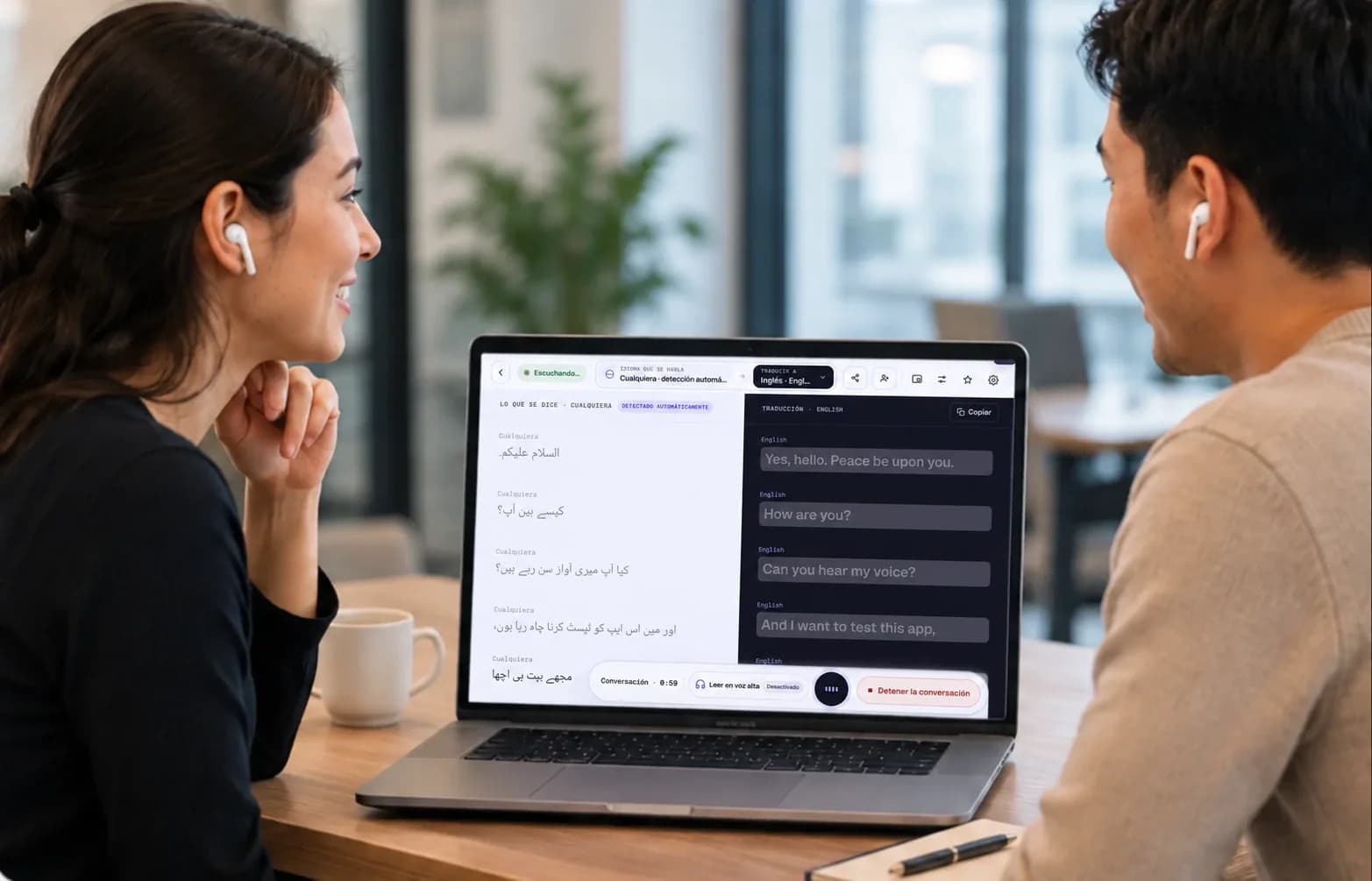
The screen splits in two. Your half faces you, their half faces them, so nobody has to lean over or pass it back and forth.
Each of you reads the other in your own language, in the same second. Turn on Read Aloud to hear it too, on speaker or in your earbuds.
60+ languages
Speech goes in as one language and comes out as another in the same breath — same phone, same browser. Nothing to pair, nothing to download.
See all languagesVideo meetings
Daniel speaks Spanish. Everyone else reads along in their own language, live, on their own screen. Nobody waits for an interpreter.
 Daniel · EspañolSpeaking
Spoken · es¿Podemos adelantar la entrega al jueves?
Can we move the delivery up to Thursday?
 Omar·العربية
هل يمكننا تقديم موعد التسليم إلى يوم الخميس؟
 Mei·日本語
納品を木曜日に早められますか?
 Ravi·हिन्दी
क्या हम डिलीवरी गुरुवार तक पहले कर सकते हैं?
 You·English
Can we move the delivery up to Thursday?
Universal.Effortless.Borderless.
The hardware-locked way
And the person in front of you — the pharmacist, the landlord, the taxi driver, your mother-in-law — doesn’t care what’s in your pocket. They just want to understand you.
With Mingle
Mingle removes the hardware question entirely. It runs in the browser you already have, captures speech with the microphone you already own, and speaks the translation through whatever earbuds are already in your ears.
Your phone was always enough. Now it acts like it.
Live translation
Set your phone on the table facing them. Their voice goes into your phone’s mic; the translation arrives quietly in your Bluetooth earbuds — private, hands-free, no screen-passing, no shouting into a gadget. It feels less like using a translator and more like understanding.
Any mic in, any audio out — that’s the whole point.

They say · ArabicListening
In your earbuds · English
Reading aloud
With earbuds in, the spoken translation goes only to you.
Where it helps
A market stall, a hotel desk, a pharmacy counter, a call with your in-laws. Same phone, same browser — the conversation just keeps going.
What it does
Nine things the product actually does. Swipe through, or let it run.
See every sentence transcribed and translated as it’s spoken, with captions streaming as words are spoken.
1,689 hand-curated slang and colloquial entries across 14 languages — including 4 Arabic dialects (Egyptian, Levantine, Hijazi, Gulf) — so 'that blew up' never becomes nonsense in translation.
Toggle Read Aloud and hear translations in a clear, human-sounding voice — publicly on speaker or privately in your earbuds.
Talking both ways? Tap Share session and show the QR code. They join on their own phone in their own language, and each of you reads the other live. No app, and no account for them.
iPhone, Android, tablet, desktop. AirPods, Galaxy Buds, wired, or none. Zero hardware lock-in.
Runs entirely in the browser over HTTPS. Share a session and the other person joins from their own browser in seconds.
Give someone access to Mingle on your plan with an invite link: they sign in and run their own sessions. Available on Pro, Business, Business Plus, and Enterprise plans.
Signed-in users keep searchable transcripts of every conversation — great for follow-ups, invoices, and "what exactly did they say?"
Your conversations aren’t ad fuel. Essential cookies only; optional analytics only if you accept. Audio is processed to deliver live translation — we do not sell your personal information for advertising.
The session screen
A quick tour of the screen you see once you tap Start. Pick any part to see what it does.
Language pairs
Phrase guides, live captions, and one-tap sessions for the pairs people use most.
Side by side
Mingle
Apple Live Translation
Google Translate (conversation)
Translator earbuds (Timekettle/Pocketalk class)
Maestra Live
Mingle
Apple Live Translation
Google Translate (conversation)
Translator earbuds (Timekettle/Pocketalk class)
Maestra Live
Mingle
Apple Live Translation
Google Translate (conversation)
Translator earbuds (Timekettle/Pocketalk class)
Maestra Live
Mingle
Apple Live Translation
Google Translate (conversation)
Translator earbuds (Timekettle/Pocketalk class)
Maestra Live
Mingle
Apple Live Translation
Google Translate (conversation)
Translator earbuds (Timekettle/Pocketalk class)
Maestra Live
Mingle
Apple Live Translation
Google Translate (conversation)
Translator earbuds (Timekettle/Pocketalk class)
Maestra Live
Different tools win different jobs — Maestra is excellent for streams and content dubbing; the platforms are great if you live entirely inside them. Mingle wins when two humans are standing in front of each other.
Today
Free to try.
Start as a guest with no card. Log in for up to 10 live sessions on the free plan.
When you need more
From $4/mo.
Every plan includes the full Mingle Live engine — streaming speech recognition, neural translation, and natural voice playback. Free sessions to try today; paid plans by monthly live-translation minutes, with 10% off yearly.
Cancel anytime
See pricingMingle is a real-time voice translator that runs in your web browser. Speak into any phone or computer, and it instantly shows and speaks the translation in the other person’s language — no app or special hardware needed.
No. Mingle works with any Bluetooth earbuds, wired headphones, or no headphones at all. Unlike Apple’s Live Translation, it doesn’t require AirPods or a recent iPhone.
Yes. Mingle runs in modern browsers (Chrome, Safari, Edge, Firefox) on Android, iPhone, tablets, and desktops — the same live session works across all of them.
Yes — start instantly with free guest sessions (up to 20 seconds each), no account or card. Paid plans unlock longer sessions, more monthly minutes, saved history, and guest invites.
Translations stream in near real time — captions appear as words are spoken, and spoken audio follows within moments, fast enough to follow someone as they speak.
Mingle supports 60+ languages for live speech translation. See the full list.
Yes. Tap Share session and show the QR code or send the link: they open it on their own phone, pick their language, and you both speak freely, each reading the other in your own language. You need a free account to share; they need no app and no account. On a single phone, take turns instead: a session translates one direction, and you swap the languages when they reply.
Yes. Mingle Meet is a multilingual video meeting room — each participant speaks their own language and reads live captions translated into it. Hosts need a free account; guests join with a link.
Yes. Turn on Read Aloud to speak translations through your phone’s speaker — or route them privately into your earbuds while your phone’s mic faces the other person.
No account is needed to try Mingle. Signing up (free) adds saved session history sharing a session by link, and, on supported plans, inviting others to use your plan.
Mingle processes audio to deliver live translation. We do not sell your personal information for advertising. Signed-in users control saved transcripts and can delete them anytime.
Mobile browsers pause microphone access when the screen turns off — a browser rule, not a Mingle bug. Keep the screen on during sessions.
Google Translate is a solid app-based tool. Mingle is built for continuous, face-to-face conversation in the browser — no install for either person, any-earbud private audio, two-pane live captions, and saved transcripts.
No download. No card. No wrong phone. Open Mingle, pick two languages, and talk.


